
🌈 The miracle product has arrived! (no)
Ah yes, project tracking, tickets, documentation, and Git synchronization… a great passion shared by all developers across the world. Trying to industrialize all that is a fairly solid definition of hell (we all hate you, Jira 😠).
But we did get a new player in the game: AI. Now, while I still have a few doubts about the upcoming death of the developer profession and the rise of vibe-coding, there is one thing AI is genuinely very good at: applying patterns and handling Markdown files (.md for close friends).
And you know what? There just so happens to be a note-taking tool that runs entirely on Markdown files: Obsidian. Its whole thing is centralizing .md notes through frontmatter metadata, which lets it generate views and Kanban-like representations.
At the beginning of 2026, I had a little epiphany and realized there might be a way to fully automate project management by combining Obsidian for the frontend and AI for the backend (my engineer heart is bleeding heavily just writing that sentence… 😭).
So what I’m going to present here is a project management process built through Obsidian, centralized in the codebase, and automated by AI (for gamedev or anything else):
- a centralized documentation layer (functional and technical specifications, architecture and operations notes, Excalidraw and Mermaid diagrams, design reference folders…)
- a centralized AI skills layer, which becomes provider-agnostic once set up, with automatic replication of minimalist skills to every AI client present in the project
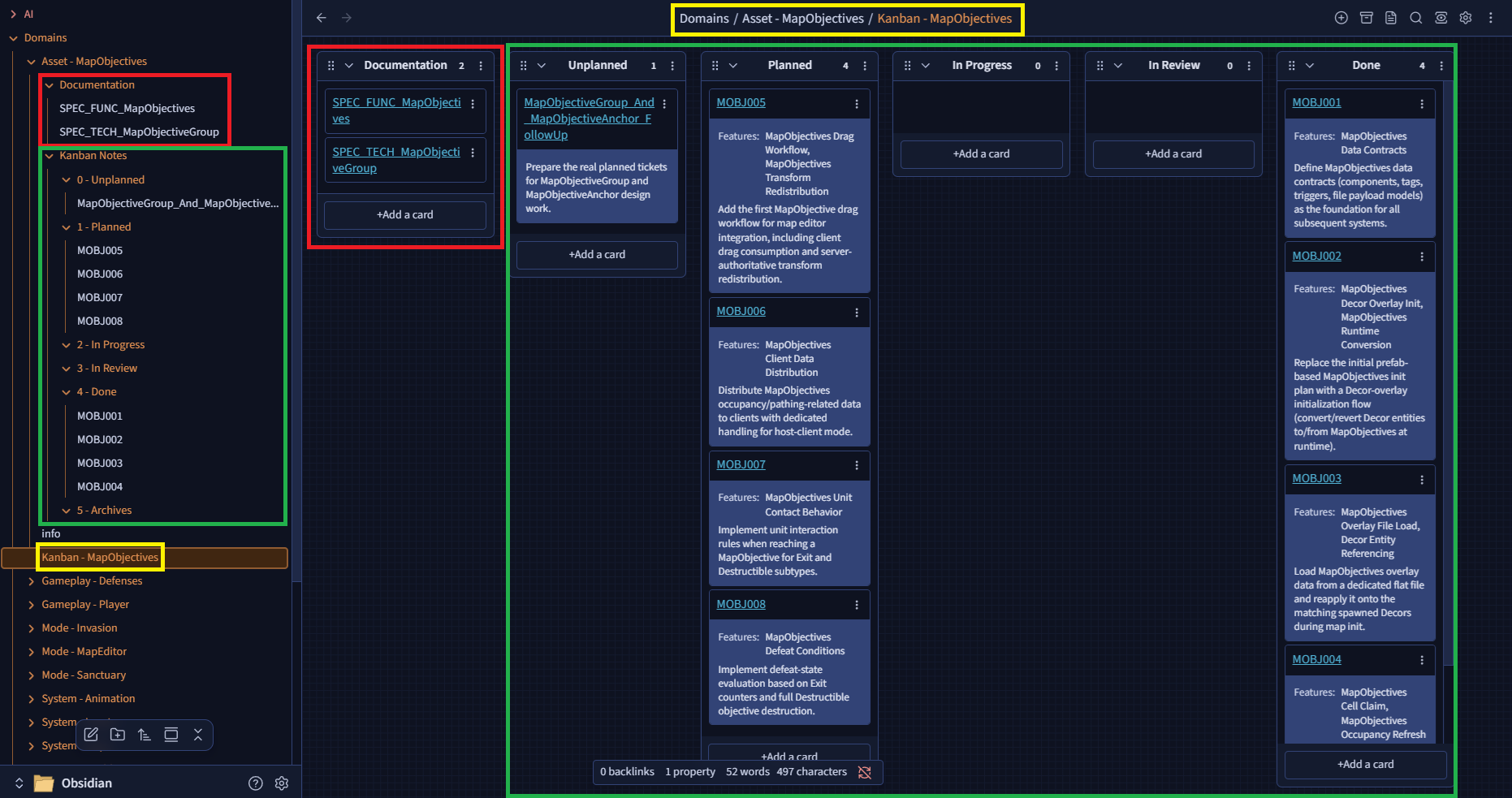
- an automated Kanban workflow driven through conversations with the AI
- synchronized writing of Git commits from the associated Kanban ticket
- project tracking embedded into the code: every part of a delivered feature gets committed together (docs, tickets, and code)
Interested in the concept? Then head over to the GitHub page for the installation and usage process: https://github.com/Keilthar/Obsidian-Workflow
My personal experience with this tool
It removes a huge amount of progress-tracking overhead from an ambitious project like mine. I now have a simple workflow for storing an idea, then breaking it down with AI into logical tasks that I can handle over time without having to constantly re-explain where we are, what we’ve done, where we’re going, and why… which is a pretty significant mental load when you work with AI (virtual babysitting 🍼).
I also get a reliable documentation layer out of it (which I absolutely do not read, the AI summarizes it for me 😌… that would actually be a pretty fun topic to philosophize about someday: do we still need docs written for humans?).
And I get a much cleaner Git history, whether we’re talking about the declarative side of things (standardized title, complete description), how changes are split up (logical file sets grouped by AI instead of by my monumental laziness), or sheer frequency (I’m slowly drifting toward more atomic commits).
The rest of the devlog
This article is not about how to use the workflow (you have a nice README for that), but about how I designed it, the logic behind it, the problems it tries to solve, and how I implemented it for my own gamedev setup.
Lighter through segmentation
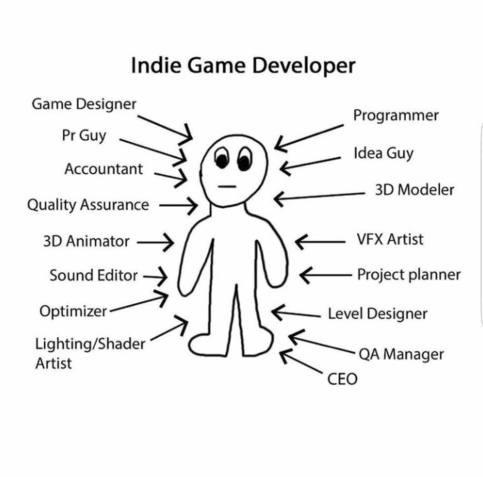
Gamedev has a particular trait: we have very distinct functional scopes to manage within the same application.
Handling unit behavior and pathfinding has nothing to do with managing player input to control a character, which has nothing to do with managing assets to generate the map, and so on, and so on, and so on.
(and I am not even getting into all the sub-sections with specific needs for each discipline: dev, 2D/3D design, animation, VFX, UI/UX, sound design…)
And even if some features sit at the crossroads of several functional scopes, it is still convenient to organize information by domain. That became one of the core principles of my design: the ability to segment project management instead of dumping everything into one giant Kanban board where I have to filter through dozens of scopes every single time I touch something.
In the context of my game, the structure looks like this:
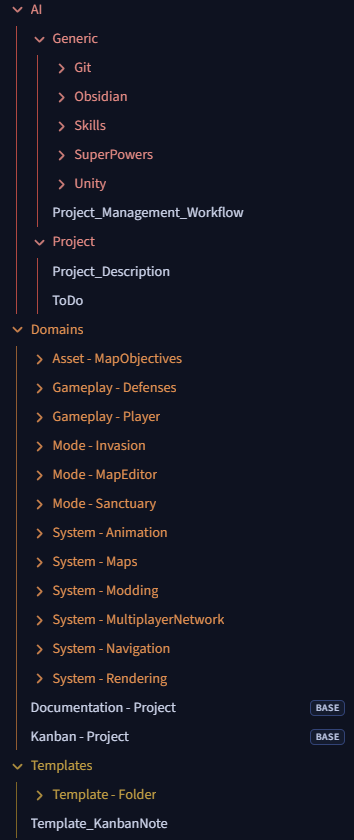
/AI/Generic: all the procedures used by the AI. This folder is agnostic, independent of the specific project and of the AI that will consume it. It contains:
- the processes used to interact with /Obsidian and /Git
- cross-cutting skills (example: /SuperPowers)
- my own coding skills (example: /Unity), which honestly deserve their own article because they make AI coding much nicer…
Project_Management_Workflow.md is the entry point for this directory: it tells the AI how and when to use the documentation in these folders.
/AI/Project: contains project-specific guidance to give the AI useful context.
Project_Description.md is the entry point for this directory: it contains a general description of the game and can reference other docs when needed (for example ToDo).
Domains:
- one folder per functional domain of my game. Each folder carries its own documentation, a dedicated Kanban, and the notes associated with its tickets
- two
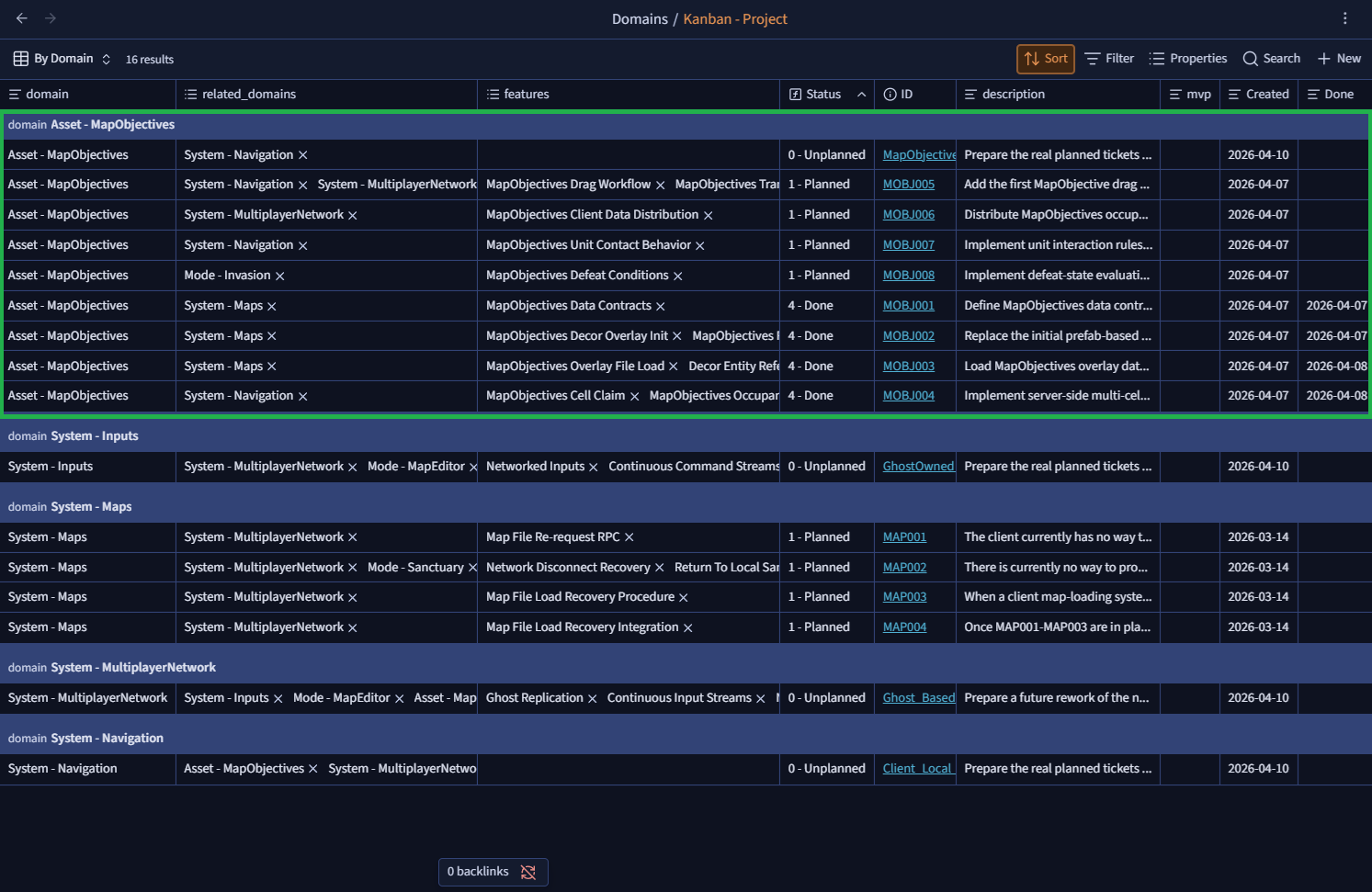
.basefiles, Documentation - Project and Kanban - Project: these are global Kanban-style views listing all documentation and all tickets across the Obsidian vault
Templates: templates used by the AI to add new domains with their full folder structure and create normalized Kanban tickets.
Mini Kanbans and AI: the winning combo (for tokens) Even if you do not desperately need that kind of functional split, there is still an economic upside to it:
not blowing up your AI context by making it load one giant kanban filled with hundreds of tickets (or more, if you favor atomic tickets and commits)!
And for a global MVP tracking board?
.basefiles! It is an Obsidian aggregation feature built on ticket metadata ⇒ 0 AI cost!
Big brain AI 🧠
As I already mentioned, the AI setup aims to be as agnostic and centralized as possible. But you may ask: why?
Well, I have two major problems:
- first: whenever I change a procedure and switch from one AI to another (say, Claude and Codex totally at random), I have to painstakingly duplicate those procedures across every relevant subfolder
- second: some skills overlap in terms of process. For example, the
git commitskill and theproject-managementskill both need access to the ticket reading/editing procedure. Without centralization, I end up duplicating the same procedure in both skills. And if I want to change it and forget one of them… kaboom 💥
So the idea is to build a system with three levels of responsibility:
- minimalist files on the AI provider side: they carry no functional responsibility and only consume centralized entry points in the vault
- those entry points only define the chaining logic of actions, not the detailed action itself
- detailed action procedures (
Ticket_Create,Ticket_Move,Ticket_Remove) that can be consumed by several entry points
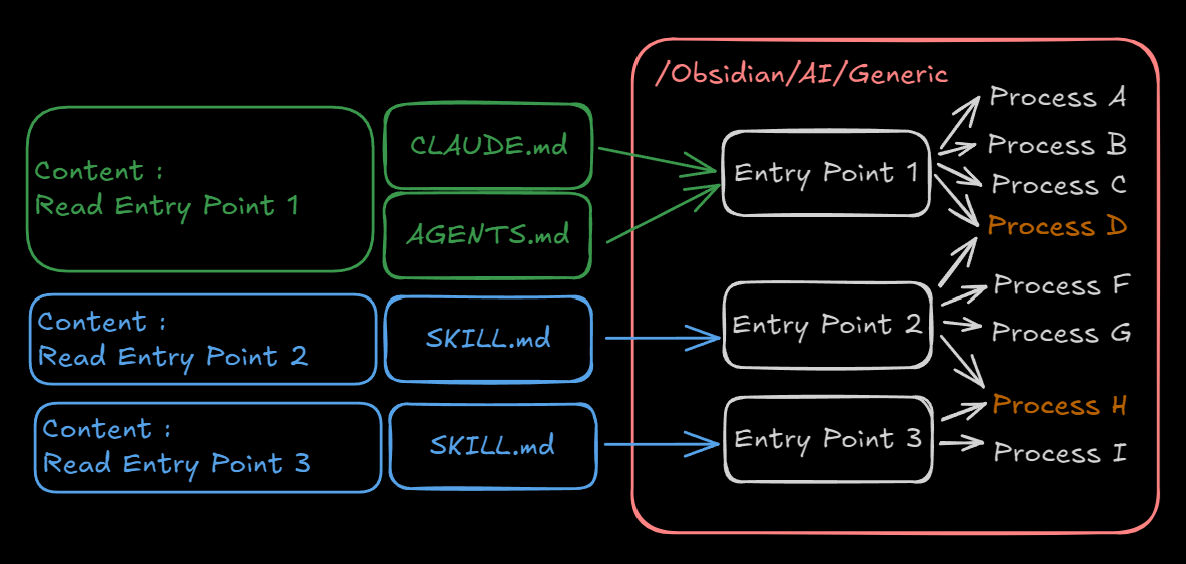
This is literally KISS applied to project management. Each actor has a narrow scope:
- the AI provider is the interface for the client
- the entry point is the interface for the AI provider
- the process is the end-of-chain consumable, shareable and atomic
On the AI side, that leaves us with files of disarming simplicity: just a reading list, sometimes paired with a contextual trigger.
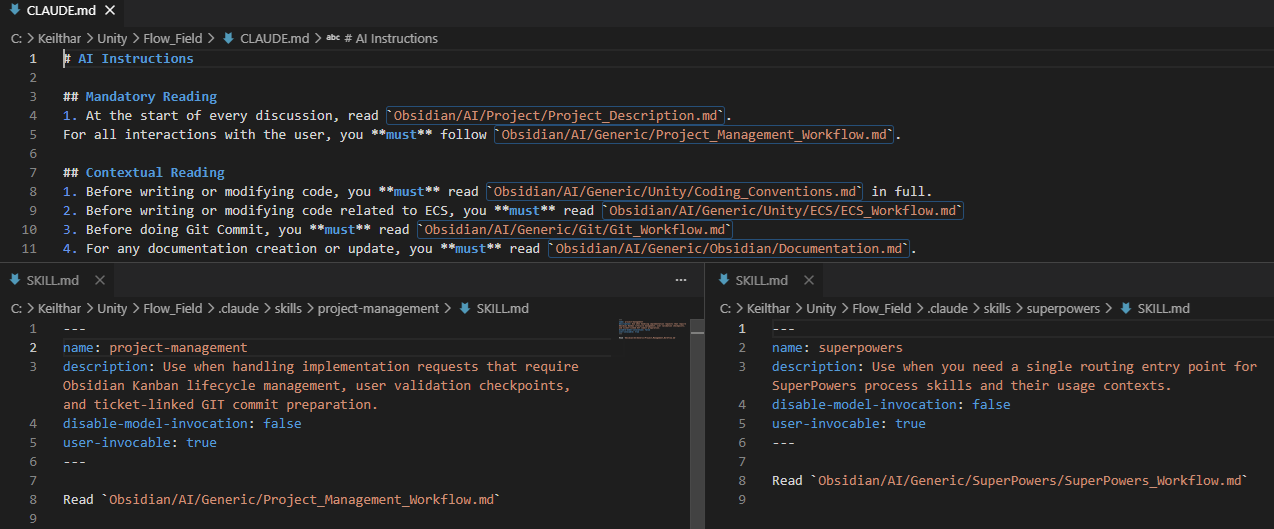
And to take that logic all the way, I created a skill that creates minimalist skills and duplicates them across every AI client detected in the repository.
So now I no longer worry about synchronizing my AIs with my processes: all that matters are my entry points and the unit processes sitting beneath them. (Which is kind of funny, because it is the exact same approach I use when implementing ECS. This is data-driven project management at heart 😍)
What are the 2 skills for if they just repeat a pointer already present in AGENTS.md and CLAUDE.md?Sometimes the AI loses the thread and stops following some instructions. That is simply one of its built-in flaws.If I notice drift, or after a
/compactin the conversation, I simply type/project-managementor/superpowersto force the AI to reread the procedures and bring them back into context. With that trick, I can maintain a decent level of consistency even in long discussions.
Metadata, or rather the AI metasystem
Technically speaking, the Kanban is just a visual support in this process and no longer an interface in the interactive sense of the word. The AI is both the backend (or rather the .md files it tries to follow) and the invisible hand, not of the market, but of the frontend.
But we still need a link between those two layers. In a standard application, that link is the database. Here, the database is the metadata (in the literal sense: data about data).
And in the context of this AI + Obsidian combo, we have two sources of metadata:
- the
.mdfiles carrying the contextual description of actions (project description, logical action flow, technical and functional documentation…), which act as the rails that tell the AI why it is doing what it is doing and how. That is the backend logic, really. Without that, you end up with a blind driver following voice commands from a GPS: “turn left”. Why? At what angle? At what speed? No idea… boom, wall. And that is exactly why I treat.mdfiles the same way I treat ECS: the underlying logic is the same. - the ticket frontmatters, which ensure the stability of the system. What state am I starting from? Which state can I move to next? That metadata is what links everything back to the frontend representation.
And it is kind of funny, but in a way, YAML frontmatter is just a flat-file database. Here is the one used for my tickets:
---
ID:
Description:
domain:
related_domains: []
features: []
status:
mvp:
Created:
Done:
---
And this is where the Obsidian layer lightens the process on the AI side. The ability to aggregate notes through their metadata into views is what makes this combo so strong for us users. I can aggregate through:
- the Kanban plugin, which relies on a raw
.md - the BASE feature, which uses an internal
IndexedDB, optimized for list and table-like display - or even a
DataviewJSscript, with its own indexing engine and greater rendering flexibility
In theory, we could build much more interesting visual layers than what I implemented here. And we could also lock the system down to prevent bad user manipulations, or even support a collaborative approach with AI-managed logical locks (even if that would not be a perfect solution).
Anyway, I have only scratched the surface here. This is still just a side project I built over a few months to help me with my day-to-day gamedev work, which remains my actual priority. But I see huge potential in it as an alternative to this kind of tooling, especially for small, flexible, iterative communities and projects.
Hopefully this made you want to give Obsidian a try. I barely even touched on what it can do as a note-taking tool in its own right.
With that said, get back to your tickets, ladies and gentlemen.